Organize protein design runs and candidates around a research question.
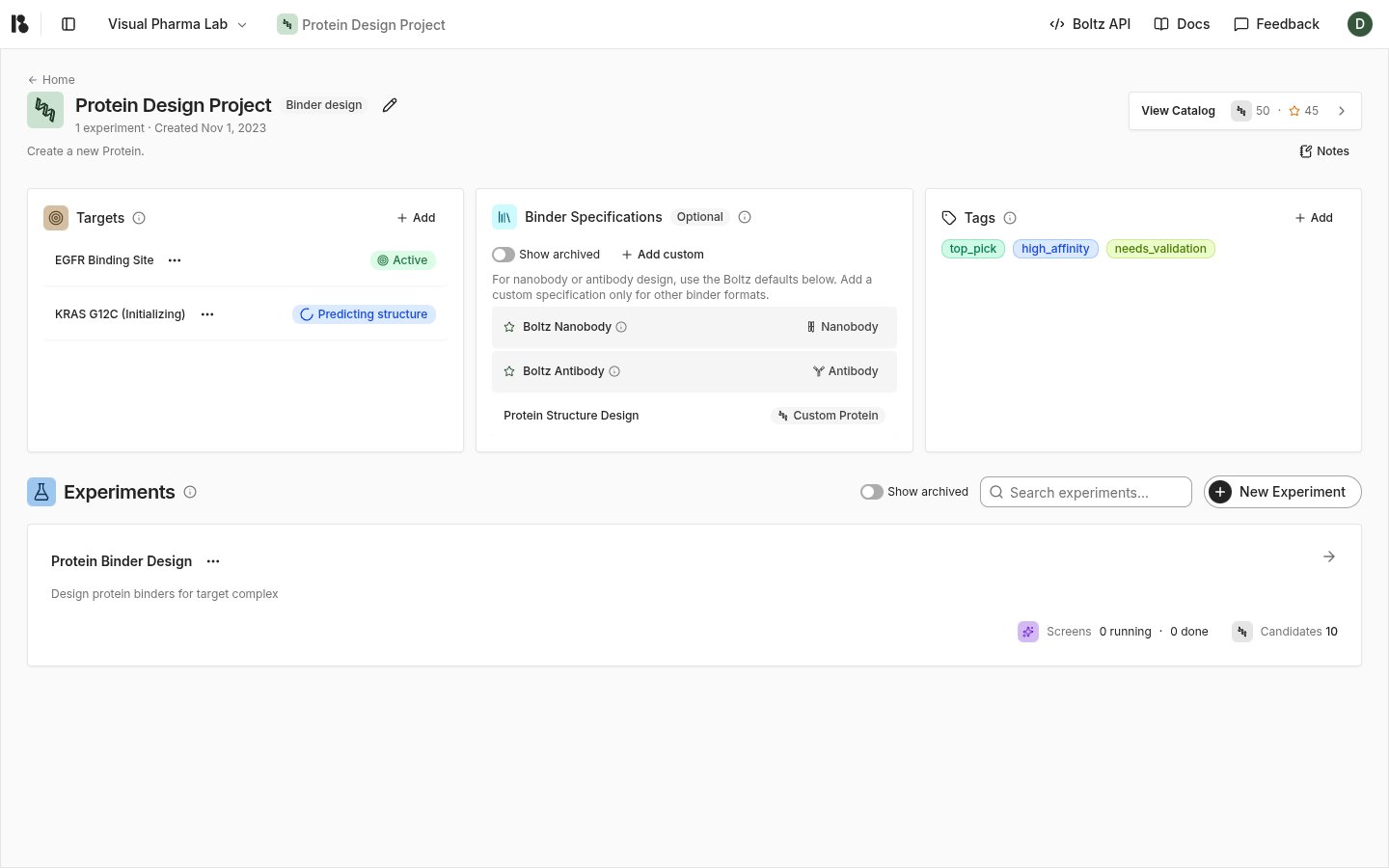
Open a Binder design project with write access. Complete a target setup before configuring a design run.
In the project, choose New Experiment.
Enter a name that identifies the research question.
Add a hypothesis to explain the desired result.
Choose Create Experiment.
For example, use the name PD-L1 interface binders and describe which interface you want to block or preserve. Record the biological reason for your site and selectivity choices in the hypothesis.
An experiment groups runs and their candidates. You can compare alternative binder specifications or design efforts while keeping the target hypothesis explicit.Open the experiment’s design action to choose a completed target, binder specifications, and run settings. See Run protein design.
{"docsConfig":{"theme":"aspen","$schema":"https://mintlify.com/docs.json","name":"Boltz Lab Docs","description":"Documentation Supporting Boltz Lab","colors":{"primary":"#35583d","light":"#67826b","dark":"#35583d"},"logo":{"light":"https://mintcdn.com/boltzpbc/cp3ccvnsHxzXedv4/logo/light.svg?fit=max\u0026auto=format\u0026n=cp3ccvnsHxzXedv4\u0026q=85\u0026s=d05aa9ff47124faa49f46ae1018d35a4","dark":"https://mintcdn.com/boltzpbc/cp3ccvnsHxzXedv4/logo/dark.svg?fit=max\u0026auto=format\u0026n=cp3ccvnsHxzXedv4\u0026q=85\u0026s=32dc07cca65226781f50f975b777f7fd"},"favicon":"https://mintcdn.com/boltzpbc/n66xdmAV0q6mHcrO/favicon.svg?fit=max\u0026auto=format\u0026n=n66xdmAV0q6mHcrO\u0026q=85\u0026s=a12acd12d3a1c3b2f300a8f6322013ff","appearance":{"default":"system"},"background":{"color":{"light":"#fafafa","dark":"#1f1f1f"}},"navbar":{"links":[{"href":"mailto:support@boltz.bio","label":"Email Support"},{"href":"https://boltz.com/","label":"Boltz Website"},{"href":"https://api.boltz.com/docs","label":"Boltz API"}],"primary":{"type":"button","label":"Go to Boltz Lab","href":"https://lab.boltz.com/"}},"footer":{"socials":{"x":"https://x.com/GabriCorso","github":"https://github.com/jwohlwend/boltz","linkedin":"https://www.linkedin.com/company/boltz-bio","slack":"https://boltz.bio/join-slack"}},"icons":{"library":"lucide"},"contextual":{"options":["copy","view","chatgpt","claude","perplexity","mcp","cursor","vscode"],"display":"header"},"styling":{"latex":false},"navigation":{"global":{"anchors":[]},"pages":[]}},"deployment":{"deploymentMetadataValue":{"subdomain":"boltzpbc","hasAudioNarration":false,"actualSubdomain":"boltzpbc","customDomains":["docs.boltz.com"],"gitSource":{"type":"github","owner":"boltz-bio","repo":"platform-docs","deployBranch":"main","contentDirectory":"","isPrivate":true,"mountPath":"","label":""},"entitlements":{"AI_CHAT":{"status":"ENABLED"},"WEB_MCP":{"status":"ENABLED"},"NARRATION":{"status":"ENABLED"}},"buildId":"6ae8655e0e678b1f73a09157","clientVersion":"0.0.4111","searchFilterCounts":[{"language":"default","tag":"User Guide","count":34},{"language":"default","tag":"Design Projects - Protein","count":8},{"language":"default","tag":"Sandbox","count":8},{"language":"default","tag":"Settings and Administration","count":7},{"language":"default","tag":"Design Projects - Small Molecules","count":7},{"language":"default","tag":"Constraints","count":5},{"language":"default","tag":"Introduction","count":4},{"language":"default","tag":"Legal","count":2},{"language":"default","tag":"Privacy Policy","count":1},{"language":"default","tag":"Terms of Service","count":1}]},"assistantConfig":{},"basePath":"","hasChatPermissions":true,"hasWebMcpPermissions":true,"toggles":[{"name":"kill-isr","enabled":true,"variant":{"name":"disabled","enabled":false,"feature_enabled":true},"impressionData":false},{"name":"custom-rbac-roles","enabled":true,"variant":{"name":"disabled","enabled":false,"feature_enabled":true},"impressionData":false},{"name":"agent-mintlify-slack","enabled":true,"variant":{"name":"disabled","enabled":false,"feature_enabled":true},"impressionData":false},{"name":"agent-integrations-settings","enabled":true,"variant":{"name":"disabled","enabled":false,"feature_enabled":true},"impressionData":false},{"name":"rbac-expansion","enabled":true,"variant":{"name":"disabled","enabled":false,"feature_enabled":true},"impressionData":false},{"name":"automations-pr-grouping","enabled":true,"variant":{"name":"disabled","enabled":false,"feature_enabled":true},"impressionData":false},{"name":"custom-prefix","enabled":true,"variant":{"name":"disabled","enabled":false,"feature_enabled":true},"impressionData":false},{"name":"analytics-v7","enabled":true,"variant":{"name":"disabled","enabled":false,"feature_enabled":true},"impressionData":false},{"name":"user-flows-analytics","enabled":true,"variant":{"name":"disabled","enabled":false,"feature_enabled":true},"impressionData":false},{"name":"no-publish-flow","enabled":true,"variant":{"name":"disabled","enabled":false,"feature_enabled":true},"impressionData":false},{"name":"workos-onboarding","enabled":true,"variant":{"name":"disabled","enabled":false,"feature_enabled":true},"impressionData":false},{"name":"llms-txt-v2","enabled":true,"variant":{"name":"disabled","enabled":false,"feature_enabled":true},"impressionData":false},{"name":"snapshot-serving-live","enabled":true,"variant":{"name":"disabled","enabled":false,"feature_enabled":true},"impressionData":false},{"name":"stripTemperatureMiddleware","enabled":true,"variant":{"name":"disabled","enabled":false,"feature_enabled":true},"impressionData":false},{"name":"support-platform-pylon-zendesk","enabled":true,"variant":{"name":"disabled","enabled":false,"feature_enabled":true},"impressionData":false},{"name":"snapshot-serving","enabled":true,"variant":{"name":"disabled","enabled":false,"feature_enabled":true},"impressionData":false},{"name":"instant-rollback","enabled":true,"variant":{"name":"disabled","enabled":false,"feature_enabled":true},"impressionData":false},{"name":"granular-notifications-server","enabled":true,"variant":{"name":"disabled","enabled":false,"feature_enabled":true},"impressionData":false},{"name":"granular-notifications","enabled":true,"variant":{"name":"disabled","enabled":false,"feature_enabled":true},"impressionData":false},{"name":"automations-fable","enabled":true,"variant":{"name":"disabled","enabled":false,"feature_enabled":true},"impressionData":false},{"name":"fixed-ai-action-pricing","enabled":true,"variant":{"name":"disabled","enabled":false,"feature_enabled":true},"impressionData":false},{"name":"automation-resolve-merge-conflict","enabled":true,"variant":{"name":"disabled","enabled":false,"feature_enabled":true},"impressionData":false},{"name":"scoped-publishing","enabled":true,"variant":{"name":"disabled","enabled":false,"feature_enabled":true},"impressionData":false},{"name":"mintql","enabled":true,"variant":{"name":"disabled","enabled":false,"feature_enabled":true},"impressionData":false},{"name":"page-level-analytics","enabled":true,"variant":{"name":"disabled","enabled":false,"feature_enabled":true},"impressionData":false},{"name":"editor-version-history-v2","enabled":true,"variant":{"name":"disabled","enabled":false,"feature_enabled":true},"impressionData":false},{"name":"billing-page-v2","enabled":true,"variant":{"name":"disabled","enabled":false,"feature_enabled":true},"impressionData":false},{"name":"full-page-search","enabled":true,"variant":{"name":"disabled","enabled":false,"feature_enabled":true},"impressionData":false},{"name":"workspace-projects","enabled":true,"variant":{"name":"disabled","enabled":false,"feature_enabled":true},"impressionData":false},{"name":"assistant-v5","enabled":true,"variant":{"name":"disabled","enabled":false,"feature_enabled":true},"impressionData":false},{"name":"fork-pr-previews","enabled":true,"variant":{"name":"disabled","enabled":false,"feature_enabled":true},"impressionData":false},{"name":"revalidation-jwt","enabled":true,"variant":{"name":"disabled","enabled":false,"feature_enabled":true},"impressionData":false},{"name":"workos-sso-scim","enabled":true,"variant":{"name":"disabled","enabled":false,"feature_enabled":true},"impressionData":false},{"name":"hobby-abuse-scan","enabled":true,"variant":{"name":"disabled","enabled":false,"feature_enabled":true},"impressionData":false},{"name":"dashboard-inbox","enabled":true,"variant":{"name":"disabled","enabled":false,"feature_enabled":true},"impressionData":false},{"name":"workos-signup","enabled":true,"variant":{"name":"disabled","enabled":false,"feature_enabled":true},"impressionData":false},{"name":"turbopuffer-dual-write","enabled":true,"variant":{"name":"disabled","enabled":false,"feature_enabled":true},"impressionData":false},{"name":"workos-enabled","enabled":true,"variant":{"name":"disabled","enabled":false,"feature_enabled":true},"impressionData":false},{"name":"approve-review-flow","enabled":true,"variant":{"name":"disabled","enabled":false,"feature_enabled":true},"impressionData":false},{"name":"editor-metadata","enabled":true,"variant":{"name":"disabled","enabled":false,"feature_enabled":true},"impressionData":false},{"name":"sso-setup-deadline-banner","enabled":true,"variant":{"name":"disabled","enabled":false,"feature_enabled":true},"impressionData":false},{"name":"turbopuffer-serve","enabled":true,"variant":{"name":"disabled","enabled":false,"feature_enabled":true},"impressionData":false},{"name":"live-agents","enabled":true,"variant":{"name":"disabled","enabled":false,"feature_enabled":true},"impressionData":false}],"googleFontsInlined":false},"customCss":[],"page":{"pagePath":"user-guide/design-project-prot/Creating-Experiments","slug":"/user-guide/design-project-prot/Creating-Experiments","pageMetadata":{"title":"Create an experiment","description":"Organize protein design runs and candidates around a research question.","href":"/user-guide/design-project-prot/Creating-Experiments"},"description":{"compiledSource":"\"use strict\";\nconst {jsx: _jsx} = arguments[0];\nconst {useMDXComponents: _provideComponents} = arguments[0];\nfunction _createMdxContent(props) {\n const _components = {\n p: \"p\",\n ..._provideComponents(),\n ...props.components\n };\n return _jsx(_components.p, {\n children: \"Organize protein design runs and candidates around a research question.\"\n });\n}\nfunction MDXContent(props = {}) {\n const {wrapper: MDXLayout} = {\n ..._provideComponents(),\n ...props.components\n };\n return MDXLayout ? _jsx(MDXLayout, {\n ...props,\n children: _jsx(_createMdxContent, {\n ...props\n })\n }) : _createMdxContent(props);\n}\nreturn {\n default: MDXContent\n};\n","frontmatter":{},"scope":{}},"pageType":"default","mdx":{"mdxSource":{"compiledSource":"\"use strict\";const{Fragment:_Fragment,jsx:_jsx,jsxs:_jsxs}=arguments[0];const{useMDXComponents:_provideComponents}=arguments[0];function _createMdxContent(props){const _components={a:`a`,li:`li`,ol:`ol`,p:`p`,strong:`strong`,..._provideComponents(),...props.components},{Frame,OptimizedImage}=_components;if(!Frame)_missingMdxReference(`Frame`,true);if(!OptimizedImage)_missingMdxReference(`OptimizedImage`,true);return _jsxs(_Fragment,{children:[_jsx(_components.p,{children:`Open a Binder design project with write access. Complete a target setup before configuring a design run.`}),`\n`,_jsxs(_components.ol,{children:[`\n`,_jsxs(_components.li,{children:[`In the project, choose `,_jsx(_components.strong,{children:`New Experiment`}),`.`]}),`\n`,_jsx(_components.li,{children:`Enter a name that identifies the research question.`}),`\n`,_jsx(_components.li,{children:`Add a hypothesis to explain the desired result.`}),`\n`,_jsxs(_components.li,{children:[`Choose `,_jsx(_components.strong,{children:`Create Experiment`}),`.`]}),`\n`]}),`\n`,_jsxs(_components.p,{children:[`For example, use the name `,_jsx(_components.strong,{children:`PD-L1 interface binders`}),` and describe which interface you want to block or preserve. Record the biological reason for your site and selectivity choices in the hypothesis.`]}),`\n`,_jsx(Frame,{children:_jsx(OptimizedImage,{src:`https://mintcdn.com/boltzpbc/ItzMCObz_E067R9t/images/current/project-home.png?fit=max\u0026auto=format\u0026n=ItzMCObz_E067R9t\u0026q=85\u0026s=1ed6cb24068ba1c7c27065e288b73bd3`,alt:`Project workspace containing targets and experiments`,\"data-og-width\":`1440`,width:`1440`,\"data-og-height\":`900`,height:`900`,\"data-path\":`images/current/project-home.png`,\"data-optimize\":`true`,\"data-opv\":`3`,srcset:`https://mintcdn.com/boltzpbc/ItzMCObz_E067R9t/images/current/project-home.png?w=280\u0026fit=max\u0026auto=format\u0026n=ItzMCObz_E067R9t\u0026q=85\u0026s=b7dd2c8b623cb5d59a1fa41392c866a8 280w, https://mintcdn.com/boltzpbc/ItzMCObz_E067R9t/images/current/project-home.png?w=560\u0026fit=max\u0026auto=format\u0026n=ItzMCObz_E067R9t\u0026q=85\u0026s=42090a4f946591b83d8e9bd25b10b677 560w, https://mintcdn.com/boltzpbc/ItzMCObz_E067R9t/images/current/project-home.png?w=840\u0026fit=max\u0026auto=format\u0026n=ItzMCObz_E067R9t\u0026q=85\u0026s=e728f47a4c67fbfdfd4944ee9afa5039 840w, https://mintcdn.com/boltzpbc/ItzMCObz_E067R9t/images/current/project-home.png?w=1100\u0026fit=max\u0026auto=format\u0026n=ItzMCObz_E067R9t\u0026q=85\u0026s=f690b0017ca4090236f617aac7bdcec2 1100w, https://mintcdn.com/boltzpbc/ItzMCObz_E067R9t/images/current/project-home.png?w=1650\u0026fit=max\u0026auto=format\u0026n=ItzMCObz_E067R9t\u0026q=85\u0026s=5edea5784193c2c26404b1df2a40444b 1650w, https://mintcdn.com/boltzpbc/ItzMCObz_E067R9t/images/current/project-home.png?w=2500\u0026fit=max\u0026auto=format\u0026n=ItzMCObz_E067R9t\u0026q=85\u0026s=370b2606a08d24b52484a3e5d234e865 2500w`})}),`\n`,_jsx(_components.p,{children:`An experiment groups runs and their candidates. You can compare alternative binder specifications or design efforts while keeping the target hypothesis explicit.`}),`\n`,_jsxs(_components.p,{children:[`Open the experiment’s design action to choose a completed target, binder specifications, and run settings. See `,_jsx(_components.a,{href:`/user-guide/design-project-prot/Virtual-Screening`,children:`Run protein design`}),`.`]})]})}function MDXContent(props={}){const{wrapper:MDXLayout}={..._provideComponents(),...props.components};return MDXLayout?_jsx(MDXLayout,{...props,children:_jsx(_createMdxContent,{...props})}):_createMdxContent(props)}return{default:MDXContent};function _missingMdxReference(id,component){throw new Error(`Expected `+(component?`component`:`object`)+\" `\"+id+\"` to be defined: you likely forgot to import, pass, or provide it.\")}","frontmatter":{},"scope":{"config":{},"pageMetadata":{"title":"Create an experiment","description":"Organize protein design runs and candidates around a research question.","href":"/user-guide/design-project-prot/Creating-Experiments"}}},"mdxSourceWithNoJs":null},"mdxExtracts":{"tableOfContents":[],"codeExamples":{}},"jsLinks":[],"subdomain":"boltzpbc","siteName":"Boltz Lab Docs","title":"Create an experiment - Boltz Lab Docs","navMaps":{"firstHrefInVersion":{},"firstHrefInLanguage":{}},"lastModified":"2026-10-28T14:29:13.849Z","originalFileLocation":"user-guide/design-project-prot/Creating-Experiments.mdx"},"headHtml":"\u003cscript data-mint-head>(function(){var d=document.documentElement,p=null;if(!p){try{p=localStorage.getItem(\"isDarkMode\")}catch(e){}if(p==='true')p='dark';else if(p==='false')p='light';if(p!=='light'\u0026\u0026p!=='dark'\u0026\u0026p!=='system')p=\"system\"}var r=p==='system'?(matchMedia(\"(prefers-color-scheme: dark)\").matches?'dark':'light'):p;d.classList.remove(r==='dark'?'light':'dark');d.classList.add(r);d.setAttribute(\"data-theme-preference\",p)})();\u003c/script>\u003cmeta data-mint-head name=\"description\" content=\"Organize protein design runs and candidates around a research question.\">\u003cmeta data-mint-head name=\"application-name\" content=\"Boltz Lab Docs\">\u003cmeta data-mint-head name=\"generator\" content=\"Mintlify\">\u003clink data-mint-head rel=\"icon\" type=\"image/png\" sizes=\"192x192\" href=\"/mintlify-assets/_mintlify/favicons/boltzpbc/0QdtTmlBGdn8wI5n/_generated/favicon/android-chrome-192x192.png\" media=\"(prefers-color-scheme: light)\">\u003clink data-mint-head rel=\"apple-touch-icon\" type=\"image/png\" sizes=\"180x180\" href=\"/mintlify-assets/_mintlify/favicons/boltzpbc/0QdtTmlBGdn8wI5n/_generated/favicon/apple-touch-icon.png\">\u003clink data-mint-head rel=\"icon\" type=\"image/png\" sizes=\"16x16\" href=\"/mintlify-assets/_mintlify/favicons/boltzpbc/0QdtTmlBGdn8wI5n/_generated/favicon/favicon-16x16.png\" media=\"(prefers-color-scheme: light)\">\u003clink data-mint-head rel=\"icon\" type=\"image/png\" sizes=\"32x32\" href=\"/mintlify-assets/_mintlify/favicons/boltzpbc/0QdtTmlBGdn8wI5n/_generated/favicon/favicon-32x32.png\" media=\"(prefers-color-scheme: light)\">\u003clink data-mint-head rel=\"shortcut icon\" type=\"image/x-icon\" href=\"/mintlify-assets/_mintlify/favicons/boltzpbc/0QdtTmlBGdn8wI5n/_generated/favicon/favicon.ico\" media=\"(prefers-color-scheme: light)\">\u003clink data-mint-head rel=\"icon\" type=\"image/png\" sizes=\"192x192\" href=\"/mintlify-assets/_mintlify/favicons/boltzpbc/0QdtTmlBGdn8wI5n/_generated/favicon-dark/android-chrome-192x192.png\" media=\"(prefers-color-scheme: dark)\">\u003clink data-mint-head rel=\"icon\" type=\"image/png\" sizes=\"16x16\" href=\"/mintlify-assets/_mintlify/favicons/boltzpbc/0QdtTmlBGdn8wI5n/_generated/favicon-dark/favicon-16x16.png\" media=\"(prefers-color-scheme: dark)\">\u003clink data-mint-head rel=\"icon\" type=\"image/png\" sizes=\"32x32\" href=\"/mintlify-assets/_mintlify/favicons/boltzpbc/0QdtTmlBGdn8wI5n/_generated/favicon-dark/favicon-32x32.png\" media=\"(prefers-color-scheme: dark)\">\u003clink data-mint-head rel=\"shortcut icon\" type=\"image/x-icon\" href=\"/mintlify-assets/_mintlify/favicons/boltzpbc/0QdtTmlBGdn8wI5n/_generated/favicon-dark/favicon.ico\" media=\"(prefers-color-scheme: dark)\">\u003cmeta data-mint-head property=\"og:title\" content=\"Create an experiment - Boltz Lab Docs\">\u003cmeta data-mint-head property=\"og:description\" content=\"Organize protein design runs and candidates around a research question.\">\u003cmeta data-mint-head property=\"og:site_name\" content=\"Boltz Lab Docs\">\u003cmeta data-mint-head property=\"og:url\" content=\"https://docs.boltz.com/user-guide/design-project-prot/Creating-Experiments\">\u003cmeta data-mint-head property=\"og:type\" content=\"website\">\u003cmeta data-mint-head property=\"og:image\" content=\"https://boltzpbc.mintlify.site/_mintlify/api/og/v2?division=Design+Projects+-+Protein\u0026amp;title=Create+an+experiment\u0026amp;description=Organize+protein+design+runs+and+candidates+around+a+research+question.\u0026amp;theme=db24995b7b7f11f747e9c554\u0026amp;signature=30cad3a24872edb2dda0965149588738d16015169ca26df5ab83713899f87848\">\u003cmeta data-mint-head property=\"og:image:width\" content=\"1200\">\u003cmeta data-mint-head property=\"og:image:height\" content=\"630\">\u003cmeta data-mint-head name=\"twitter:card\" content=\"summary_large_image\">\u003cmeta data-mint-head name=\"twitter:title\" content=\"Create an experiment - Boltz Lab Docs\">\u003cmeta data-mint-head name=\"twitter:description\" content=\"Organize protein design runs and candidates around a research question.\">\u003cmeta data-mint-head name=\"twitter:image\" content=\"https://boltzpbc.mintlify.site/_mintlify/api/og/v2?division=Design+Projects+-+Protein\u0026amp;title=Create+an+experiment\u0026amp;description=Organize+protein+design+runs+and+candidates+around+a+research+question.\u0026amp;theme=db24995b7b7f11f747e9c554\u0026amp;signature=30cad3a24872edb2dda0965149588738d16015169ca26df5ab83713899f87848\">\u003cmeta data-mint-head name=\"twitter:image:width\" content=\"1200\">\u003cmeta data-mint-head name=\"twitter:image:height\" content=\"630\">\u003cmeta data-mint-head name=\"msapplication-config\" content=\"/mintlify-assets/_mintlify/favicons/boltzpbc/0QdtTmlBGdn8wI5n/_generated/favicon/browserconfig.xml\">\u003cmeta data-mint-head name=\"apple-mobile-web-app-title\" content=\"Boltz Lab Docs\">\u003cmeta data-mint-head name=\"msapplication-TileColor\" content=\"#35583d\">\u003clink data-mint-head rel=\"canonical\" href=\"https://docs.boltz.com/user-guide/design-project-prot/Creating-Experiments\">\u003clink data-mint-head rel=\"alternate\" type=\"application/xml\" href=\"/sitemap.xml\">\u003clink data-mint-head rel=\"alternate\" type=\"text/markdown\" href=\"/user-guide/design-project-prot/Creating-Experiments.md\">\u003cscript data-mint-head type=\"application/ld+json\">{\"@context\":\"https://schema.org\",\"@graph\":[{\"@type\":\"Organization\",\"@id\":\"https://docs.boltz.com/#organization\",\"name\":\"Boltz Lab Docs\",\"url\":\"https://docs.boltz.com\",\"logo\":{\"@type\":\"ImageObject\",\"url\":\"https://mintcdn.com/boltzpbc/cp3ccvnsHxzXedv4/logo/light.svg?fit=max\u0026auto=format\u0026n=cp3ccvnsHxzXedv4\u0026q=85\u0026s=d05aa9ff47124faa49f46ae1018d35a4\"}},{\"@type\":\"WebSite\",\"@id\":\"https://docs.boltz.com#website\",\"name\":\"Boltz Lab Docs\",\"url\":\"https://docs.boltz.com\",\"publisher\":{\"@id\":\"https://docs.boltz.com/#organization\"}},{\"@type\":\"WebPage\",\"@id\":\"https://docs.boltz.com/user-guide/design-project-prot/Creating-Experiments#webpage\",\"url\":\"https://docs.boltz.com/user-guide/design-project-prot/Creating-Experiments\",\"name\":\"Create an experiment\",\"description\":\"Organize protein design runs and candidates around a research question.\",\"dateModified\":\"2026-10-28T14:29:13.849Z\",\"isPartOf\":{\"@id\":\"https://docs.boltz.com#website\"},\"breadcrumb\":{\"@id\":\"https://docs.boltz.com/user-guide/design-project-prot/Creating-Experiments#breadcrumb\"}},{\"@type\":\"BreadcrumbList\",\"@id\":\"https://docs.boltz.com/user-guide/design-project-prot/Creating-Experiments#breadcrumb\",\"itemListElement\":[{\"@type\":\"ListItem\",\"position\":1,\"name\":\"Design Projects - Protein\",\"item\":\"https://docs.boltz.com/user-guide/design-project-prot/Overview\"},{\"@type\":\"ListItem\",\"position\":2,\"name\":\"Create an experiment\",\"item\":\"https://docs.boltz.com/user-guide/design-project-prot/Creating-Experiments\"}]},{\"@type\":[\"Article\",\"TechArticle\"],\"@id\":\"https://docs.boltz.com/user-guide/design-project-prot/Creating-Experiments#article\",\"headline\":\"Create an experiment\",\"name\":\"Create an experiment\",\"description\":\"Organize protein design runs and candidates around a research question.\",\"url\":\"https://docs.boltz.com/user-guide/design-project-prot/Creating-Experiments\",\"mainEntityOfPage\":{\"@id\":\"https://docs.boltz.com/user-guide/design-project-prot/Creating-Experiments#webpage\"},\"dateModified\":\"2026-10-28T14:29:13.849Z\",\"publisher\":{\"@id\":\"https://docs.boltz.com/#organization\"},\"isPartOf\":{\"@id\":\"https://docs.boltz.com#website\"}}]}\u003c/script>\u003cscript data-mint-head type=\"application/ld+json\">{\"@context\":\"https://schema.org\",\"@type\":\"WebSite\",\"name\":\"Boltz Lab Docs\",\"publisher\":{\"@type\":\"Organization\",\"name\":\"Boltz Lab Docs\"},\"provider\":{\"@type\":\"Organization\",\"name\":\"Mintlify\",\"url\":\"https://mintlify.com\"}}\u003c/script>","agentPointerHref":"/user-guide/design-project-prot/Creating-Experiments.md","siteName":"Boltz Lab Docs","nav":{"global":{"anchors":[]},"tabs":[{"tab":"User Guide","groups":[{"group":"Introduction","pages":[{"title":"Welcome to Boltz Lab","href":"/user-guide/introduction/Welcome-to-Boltz"},{"title":"Register / Log In to Boltz Lab","href":"/user-guide/introduction/Register--Log-In-to-Boltz"},{"title":"Quickstart","href":"/user-guide/introduction/Quickstart"},{"title":"Quick-Start Video","href":"/user-guide/introduction/Tutorial"}]},{"group":"Sandbox","pages":[{"title":"Sandbox","href":"/user-guide/sandbox/Overview"},{"title":"Submitting a Prediction","href":"/user-guide/sandbox/Submitting-a-Prediction"},{"title":"Viewing Results","href":"/user-guide/sandbox/Viewing-Results"},{"group":"Constraints","pages":[{"title":"Overview","href":"/user-guide/sandbox/Constraints/Overview"},{"title":"Setting Up Constraints","href":"/user-guide/sandbox/Constraints/Setting-Up-Constraints"},{"title":"Example Bond: Covalent Inhibitors","href":"/user-guide/sandbox/Constraints/Example-Bond-with-Covalent-Inhibitors"},{"title":"Example Contact: Molecular Glues","href":"/user-guide/sandbox/Constraints/Example-Contact-with-Molecular-Glues"},{"title":"Constraints in Small-Molecule Design Projects","href":"/user-guide/sandbox/Constraints/Usage-in-Design-Projects"}]}]},{"group":"Design Projects - Small Molecules","pages":[{"title":"Overview","href":"/user-guide/design-project-sm/Small-Molecule-Overview"},{"title":"Targets","href":"/user-guide/design-project-sm/Targets"},{"title":"Virtual Screening - Setup","href":"/user-guide/design-project-sm/Virtual-Screening"},{"title":"Experiments","href":"/user-guide/design-project-sm/Virtual-Screening-Monitoring"},{"title":"Results \u0026 Triage","href":"/user-guide/design-project-sm/Results-and-Triage"},{"title":"Design Tab","href":"/user-guide/design-project-sm/Design-Hub"},{"title":"Purchasing Small Molecules","href":"/user-guide/design-project-sm/Purchasing-Small-Molecules"}]},{"group":"Design Projects - Protein","pages":[{"title":"Protein binder design","href":"/user-guide/design-project-prot/Overview"},{"title":"Protein design walkthrough","href":"/user-guide/design-project-prot/Protein-Design-Example"},{"title":"Create a protein design target","href":"/user-guide/design-project-prot/Creating-Targets"},{"title":"Choose binder specifications","description":"Use Boltz binder specifications or prepare a custom design specification.","href":"/user-guide/design-project-prot/Creating-Binder-Specifications"},{"title":"Create an experiment","href":"/user-guide/design-project-prot/Creating-Experiments"},{"title":"Run a protein design screen","description":"Choose target and binder inputs, review run settings, and start protein design.","href":"/user-guide/design-project-prot/Virtual-Screening"},{"title":"Review protein binder results","href":"/user-guide/design-project-prot/Results-and-Triage"},{"title":"Protein design guidance","href":"/user-guide/design-project-prot/Tips"}]},{"group":"Settings and Administration","pages":[{"title":"Overview","href":"/user-guide/Settings-and-Administration/Overview"},{"title":"General","href":"/user-guide/Settings-and-Administration/General"},{"title":"Members","href":"/user-guide/Settings-and-Administration/Members"},{"title":"Permission Groups","href":"/user-guide/Settings-and-Administration/Permission-Groups"},{"title":"Billing","href":"/user-guide/Settings-and-Administration/Billing"},{"title":"Usage","href":"/user-guide/Settings-and-Administration/Usage"},{"title":"Profile","href":"/user-guide/Settings-and-Administration/Profile"}]}]},{"tab":"Terms of Service","pages":[{"title":"Terms of Service","href":"/terms-of-service/terms-of-service"}]},{"tab":"Privacy Policy","pages":[{"title":"Privacy Policy","href":"/privacy-policy/privacy-policy"}]}]},"basePath":"","title":"Create an experiment - Boltz Lab Docs","buildId":"dpl_DqYu5MPb49gWBBbUGgpHQUmCHY3P","deploymentId":"dpl_DqYu5MPb49gWBBbUGgpHQUmCHY3P","dynamics":["07c022d89b","a74be98ba7"],"chunks":["Frame-u3J1-UOn.js","DynamicMarkdown-B-f2cqXQ.js","zoom-image-lightbox-DTFzvaXJ.js","lightbox-handle-r17bVUz3.js"]}